A digital signage provider for a QSR chain is judged on three things a demo never shows: how prices travel from the POS, how a dark screen gets noticed, and how you leave. Every demo looks the same. The contract doesn’t. Put these questions in writing.
Why a QSR Signage Buy Isn’t an Office Signage Buy
A digital signage solution provider that sells to offices is selling playlists. A QSR chain is buying prices, dayparts and a drive-thru lane that runs 18 hours a day.
The lane is where the money is. The drive-thru has long accounted for about 70% of sales at top quick-service brands, according to QSR Magazine’s 2025 Drive-Thru Report. Seconds count there. Intouch Insight’s 26th drive-thru study, published October 1, 2026, clocked the average visit at 5 minutes 24 seconds across 13 brands and 2,145 visits. That is 11.1 seconds faster than 2025 and the fastest since 2018. The 2021 peak was 6:22.
Screens sit inside that clock. In the 2025 study, order accuracy ran 26 points higher when the order confirmation board showed the order correctly. When the board was wrong, accuracy dropped to 64%. Having a board barely moved the number. What the board showed did.
Now multiply. Subway ended 2024 with 19,502 US units. McDonald’s had 13,559. One wrong price in a template isn’t one mistake. It’s thousands of them, at the same minute. And menus dominate the glass: one vendor’s 2026 telemetry found 82% of QSR screens run menu content, the highest share of any industry.
That is the bar QSR digital signage companies have to clear. Office signage vendors don’t think in dayparts or POS price books, and they don’t count seconds in a lane.
Red flag: the reference list is all lobbies and break rooms. Then you’re the pilot.
Digital Signage Requirements to Put in Writing
A digital signage checklist for a restaurant chain starts with the POS, not the screen, because every price on the wall has to come from somewhere. Five requirements. Ask each one in writing.
1. The POS, by name. Ask: which POS systems do you sync with in production, at more than one chain? Restaurant POS is concentrated. PAR’s Brink became the exclusive POS for Burger King in North America in October 2023 and runs in more than 21,000 restaurants. Toast served 134,000 locations at the end of 2024. Oracle Simphony and NCR Voyix Aloha still run a lot of older estates. Good answer: named systems, API version, sync interval, and what happens when an item is marked out of stock. Red flag: “We have an API.”
2. Dayparts and regional pricing. Ask: can one menu template carry different prices by region and flip breakfast to lunch on every screen in a lane at the same minute? Red flag: a separate menu file for each region.
3. The franchise hierarchy. Ask: what can a franchisee change, and what is locked at headquarters? You want roles, SSO and an audit log that records who changed what, when and on which screens. Red flag: one shared login per store.
4. Offline behavior. Ask: what does the screen show when the internet drops? Good answer: the last menu from an offline cache, with changes arriving once the connection returns. Red flag: “Our uptime is 99.9%” instead of an answer.
5. Hardware and its shelf life. Ask: which player do you run on, and when do its security updates stop? Players are not equal. One vendor’s 2026 telemetry across more than 1,000 devices put median uptime at 99.31% for Apple TV players and 96.63% for Android players costing 20–150. The Android boxes logged 15.2 offline events per screen a year against 5.3, and about 18% were replaced each year against 2%. Lifecycles end fast, too. One player manufacturer’s end-of-life matrix shows about nine months between the end-of-life notice for a model in May 2022 and the end of technical support in February 2023.
“Works with any screen” isn’t an answer. Ask which player, which OS version, and the date its security updates stop.
Make Them Prove the Screen Is On
A delivery log proves a file left the server. It doesn’t prove a menu board was lit when the lunch line formed. Screens go dark in ways no log records: the display wakes up on the wrong HDMI input after a power blip, the player reports “online” while sending a black frame, a certificate expires, or a playlist runs out of active items. One integrator’s August 2026 breakdown of blank screens lists every one of these. None of them appears in a delivery report.
The fix belongs in the contract: hardware at the display, not a player grading its own homework. As a reference point, ask each finalist for the per-screen proof-of-play report a QSR digital signage solutions provider such as Decker produces with a separate Decker Verifier beside each media player. The Verifier watches the display, switches a lost HDMI input back and logs uptime by screen, so the report counts lit hours instead of sent files.

Whoever you pick, require three things. An alert when the content on a screen is older than a set threshold. A monthly uptime report by store. And a named person who gets the alert at 2 a.m. The same 2026 telemetry found 2.5% of screens “forgotten,” with no admin activity for 90 days or more. Without an alert, a screen like that can show last season’s menu for months.
Red flag: “Our dashboard shows the player online.”
Franchise Digital Signage: Fees, Data and Who Signs
Franchise digital signage has two buyers, the brand that picks the vendor and the franchisee who pays for it, and the contract has to survive both.
Fees. On July 12, 2024, the FTC issued a policy statement and staff guidance warning that charging franchisees fees not disclosed in the franchise disclosure document can violate Section 5 of the FTC Act and the Franchise Rule. Staff singled out new fees added through operations manuals instead of the franchise agreement, technology fees among them. If the brand requires a signage subscription, it belongs in the FDD.
Security. IBM’s 2025 Cost of a Data Breach report put the average US breach at $10.22 million, a record, against $4.44 million globally. The average breach took 241 days to identify and contain. Ask for a SOC 2 Type II report, not a roadmap. Ask for SSO, role-based permissions and an audit log. Ask whether players connect outbound only, with no inbound ports, and authenticate by device certificate rather than a shared password. Red flag: “enterprise-grade security” with no report attached.
Privacy. California’s CCPA covers businesses above $26.625 million in annual revenue, the threshold since January 1, 2025. New regulations add cybersecurity audits. The first report is due April 1, 2028, for businesses above $100 million in revenue, April 1, 2029, for $50–100 million, and April 1, 2030, below that. A signage vendor that touches personal data needs a service-provider contract: no selling or sharing of personal information, use limited to the stated purpose, and reasonable security.
“We don’t touch customer data” is rarely true once loyalty prompts, QR codes or audience sensors join the screen.
The Digital Signage RFP Clauses That Decide Year Three
A digital signage RFP is won in the price sheet and lost in the SLA, so read the definitions before the numbers.
Price. In one 2026 survey of 515 signage operators, 56.1% paid 11–20 per screen per month for software, 20% paid 21–50, and 1.6% paid more than $50. Digital signage solutions companies quote very differently above that line, so ask what is included and what is an add-on: integrations, monitoring, audit logs, premium support. Model five years of cost, not one.
SLA. Read the units. One enterprise vendor’s published “2-hour response” turns out to mean two business hours. The same page promises 24/7 health monitoring while phone support runs Monday to Friday, 7 a.m. to 9 p.m. Eastern. Ask for response and resolution times in clock hours, for nights and weekends.
Rollout pace. Ask how many stores a week the vendor installs, and who owns a store after install. One vendor offering a “500-store” playbook sequences 5–25 locations a week. At that rate, 500 stores take 20 to 100 weeks. Plenty of digital signage companies in the USA quote the playbook and skip the pace.
Exit. Ask for export of media, schedules and logs in standard formats, what the screens show on the day the contract ends, and the auto-renewal notice period. Red flag: export “on request,” with no format named.
Pilot Before You Sign: Multi Location Digital Signage Test
Multi location digital signage gets tested in three to five stores, on bad days, before anyone signs for three hundred. Run the ugly tests: cut the network, cut power for 30 seconds, push a broken update and roll it back, change a price in the POS, switch a daypart, and time how long it takes for someone to learn a screen went dark.
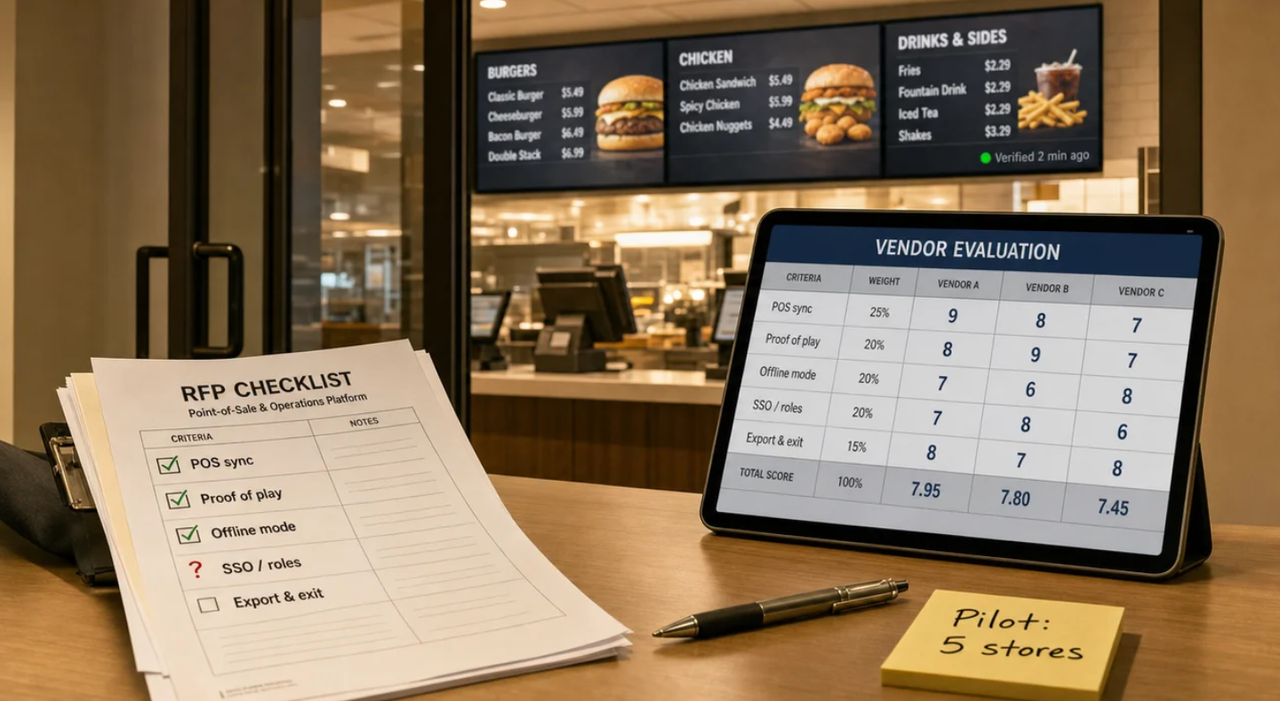
A weighting that works for most chains:
| Criterion | Weight | How to test it in the pilot |
| POS sync of prices and sold-out items | 25% | Change a price and 86 an item in the POS; time it to the screen |
| Proof of play and alerts | 20% | Pull the HDMI input; time it to the alert |
| Offline mode and recovery | 15% | Drop the network for an hour, then restore it |
| Roles and franchise controls | 15% | Have a franchisee try to edit a locked block |
| SLA and support | 10% | Open a ticket on a Saturday night |
| Five-year cost | 10% | Build one cost sheet per store |
| Export and exit | 5% | Export schedules and logs |
What a Good Digital Signage Provider Puts in Writing
A demo sells an interface. A contract sells three years. If a digital signage provider answers the POS, proof-of-play, franchise-fee and exit questions in writing, the rest is taste. If it won’t, that is your answer.
Frequently Asked Questions
What should a digital signage RFP include?
Named POS integrations, dayparts and regional pricing, franchise roles and SSO, offline behavior, proof that screens are lit, a SOC 2 Type II report, CCPA service-provider terms, an SLA in clock hours, and data export in standard formats.
How many vendors should a QSR chain shortlist?
Three for the shortlist and two for the pilot. More than that, and the pilot runs longer than the menu it is testing.
Who pays for screens in a franchise system?
Usually the franchisee, at the brand’s requirement. Whatever the arrangement, the fee belongs in the FDD. The FTC warned in July 2024 that undisclosed franchisee fees can be unlawful.

This content is brought to you by the FingerLakes1.com Team. Support our mission by visiting www.patreon.com/fl1 or learn how you send us your local content here.