
Checking an Instagram Following list can tell you which accounts someone follows, but it does not reliably tell you which connections are new. If you return a few days later, recognizing what changed can be difficult—especially when the list contains hundreds of accounts.
A more useful approach is to establish a starting list and track additions afterward. DolphinRadar’s Instagram recent follow tracker follows this approach: it saves a public profile’s current Following list as a reference, then shows newly detected accounts in a separate updates view.
The distinction matters. You can review changes found after tracking begins, but you cannot use the starting list to reconstruct earlier follow history. The displayed update time reflects when DolphinRadar first detected an account, rather than the exact moment someone followed it on Instagram.
What Does “Recently Followed” Actually Mean?
Before checking recent follows, it helps to separate two different questions:
- Who follows this person? This concerns their followers.
- Who does this person follow? This concerns their Following list.
This guide focuses on the second question: identifying new accounts appearing in someone’s Following list over time.
An existing Following list is a snapshot, not a dated activity log. An account appearing near the top should not automatically be treated as the most recent follow.
With DolphinRadar, “recent” has a specific reference point: the initial Following list saved when tracking begins. Accounts already present belong to that starting reference. Accounts newly found afterward appear in the updates view.
How to Track New Instagram Follows With DolphinRadar
The workflow separates browsing an available Following list from reviewing changes detected later. Here is how to use those two views together.
1. Start With a Public Instagram Profile
Enter the Instagram username you want to check. The profile being tracked must be public, and you do not need to sign in to Instagram to start the username-based search.
Check the username carefully before proceeding. Similar names, punctuation, and renamed accounts can make it easy to select the wrong profile.
DolphinRadar then uses the profile’s current Following list as the reference for future updates. This establishes the point from which new additions can be identified.
2. Review the Following List
The Following List tab displays the available accounts the profile follows. Use this view to understand the current list and browse individual entries.
The important point is how to interpret it: appearing in this tab does not establish that an account was followed recently. Likewise, its position does not prove where it belongs in a chronological history.
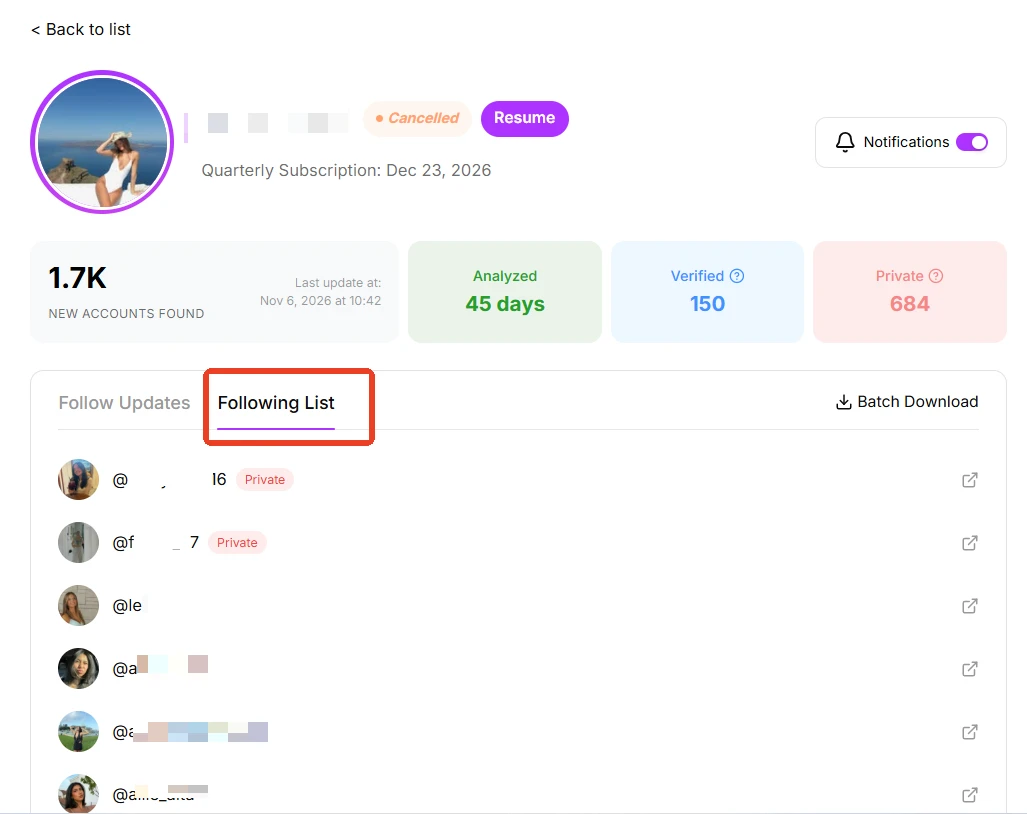
The Following List view displays available followed accounts. List position does not establish when an account was followed.
3. Check Follow Updates for Newly Detected Accounts
After the starting reference has been established, use the Follow Updates tab to review accounts found later.
This is the view to return to when your question is, “What has changed since tracking started?” It separates newly detected additions from the existing list, reducing the need to remember usernames or compare screenshots manually.
In the illustrated dashboard, entries are grouped under detection dates. Those dates help organize the updates, but they should be read as DolphinRadar’s first-seen dates—not exact Instagram follow timestamps.
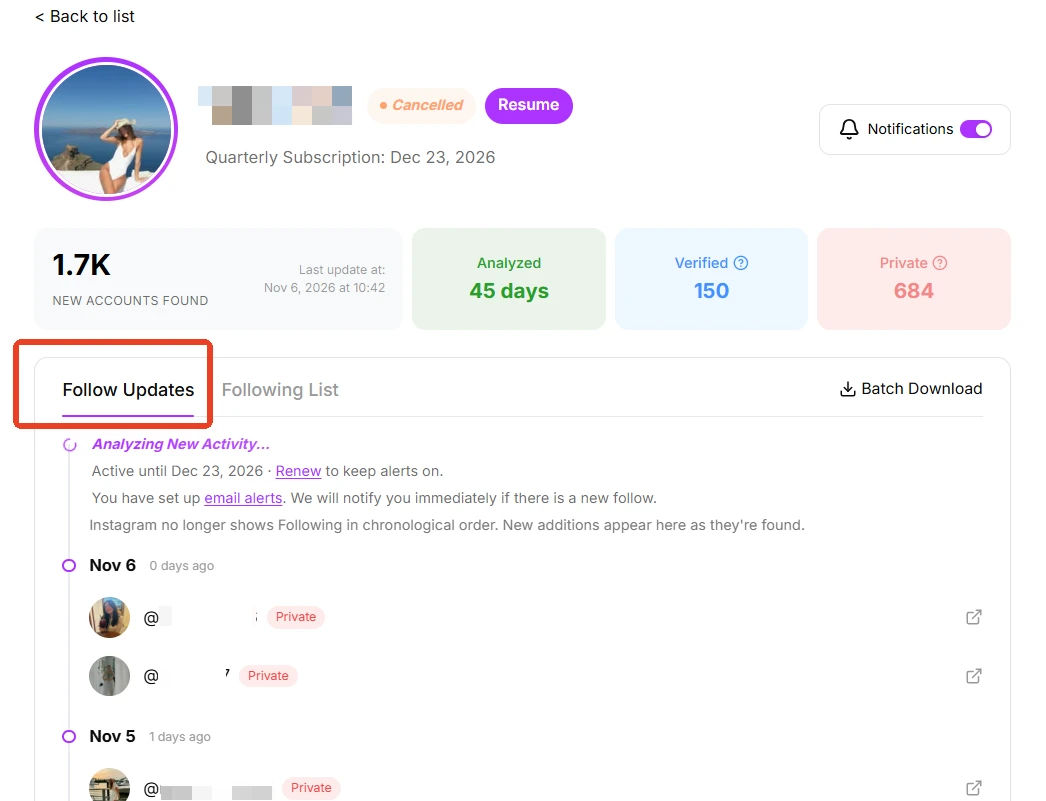
The Follow Updates view groups newly detected accounts by date. Dates indicate detection in DolphinRadar, rather than the exact time of the Instagram follow.

4. Enable Notifications if You Want Updates by Email
DolphinRadar offers email notifications for newly detected Following updates. If you prefer receiving an alert to repeatedly opening the dashboard, enable notifications and check the associated email settings.
Detection and notification timing can vary. An alert should be understood as notice that a change has been found, rather than proof that the follow happened at that moment.
Before relying on ongoing tracking, review the current plan details and the tracking status shown in your dashboard.
Viewing a Following List vs. Tracking Changes
Both approaches can be useful, but they answer different questions.
| Task | Checking a current Following list | Tracking with DolphinRadar |
|---|---|---|
| Browse accounts a profile follows | Review the currently accessible list | Use the Following List view |
| Identify additions over time | Save earlier lists and compare them yourself | Review newly detected accounts in Follow Updates |
| Keep track without repeated manual comparison | Requires your own records | Maintains a separate updates view |
| Receive email alerts | Requires a separate process | Enable available notification settings |
| Reconstruct activity before tracking began | Current list order cannot establish the history | Earlier follow history is not reconstructed |
| Establish exact Instagram follow times | The list does not provide this evidence | Displayed times indicate first detection |
If you only want to browse a profile’s current connections, a list may be enough. If you want to review additions across multiple days, keeping a reference and checking subsequent updates is more practical.
When Is Ongoing Follow Tracking Useful?
For personal users, tracking their own public profile can help them revisit accounts added after monitoring began. This can be useful when an interesting creator or business becomes difficult to find again.
For creators, new Following connections can provide leads for discovering accounts to explore. A newly detected connection might introduce a photographer, specialist, or fellow creator worth reviewing.
For marketers and researchers, Following changes can offer starting points for further investigation. If an industry account begins following a new business, that may be worth examining alongside posts, announcements, and other public information.
A follow alone does not establish a partnership, endorsement, friendship, or personal relationship. Treat it as an observable connection that may require context.
How to Interpret Results Without Overreading Them
Three distinctions make the results more useful.
Newly detected is different from historically newest. An account found after tracking starts is new relative to the saved reference. That does not create a complete record of everything that happened before it.
Detection time is different from follow time. A dated entry tells you when DolphinRadar first found the account. It does not identify the exact Instagram follow event.
A visible private-account entry does not mean private content is accessible. A private account may appear as an entry in a public profile’s available Following list. That does not provide access to its protected posts or private Following information.
If no updates appear, avoid immediately concluding that no new follows occurred. Consider the starting point, update timing, and whether the relevant information remains accessible.
Frequently Asked Questions
Can I see who someone followed before I started tracking?
DolphinRadar does not reconstruct pre-tracking follow history. The initial Following list establishes a reference, and later newly detected accounts appear as updates.
Is the first account in a Following list the newest follow?
You should not assume so. A position in an existing list is not reliable evidence of when the follow occurred.
Do I need to log in to Instagram?
DolphinRadar’s username-based workflow does not require an Instagram login. The profile being tracked must be public. Check current DolphinRadar account and plan requirements for ongoing features.
Can I track a private Instagram profile?
This workflow is intended for public profiles. It should not be treated as a way to access a private profile’s protected information.
Start With a Reference, Then Review What Changes
The useful part of recent-follow tracking is having a clear starting point. Once that reference exists, reviewing newly detected additions becomes easier than repeatedly scanning an entire Following list.
To begin, enter a public username on DolphinRadar, review the starting list, and return to Follow Updates for subsequent additions. Keep the distinction between detection time and follow time in mind, and use each update as information to review in context.

This content is brought to you by the FingerLakes1.com Team. Support our mission by visiting www.patreon.com/fl1 or learn how you send us your local content here.